Get your customs code, screen by screen
You need this code to order from overseas: Coupang Rocket Jikgu, AliExpress, Temu, iHerb. Follow the red marks.
- Free
- About 5 minutes
- Renew once a year
Screens captured from the official portal on 16 November 2026
00Have these ready
- Residence card외국인등록증 · you'll type its number
- Phone in your nameKorean number, for identity check
- Email addressCheckout codes are sent here
01Get the code
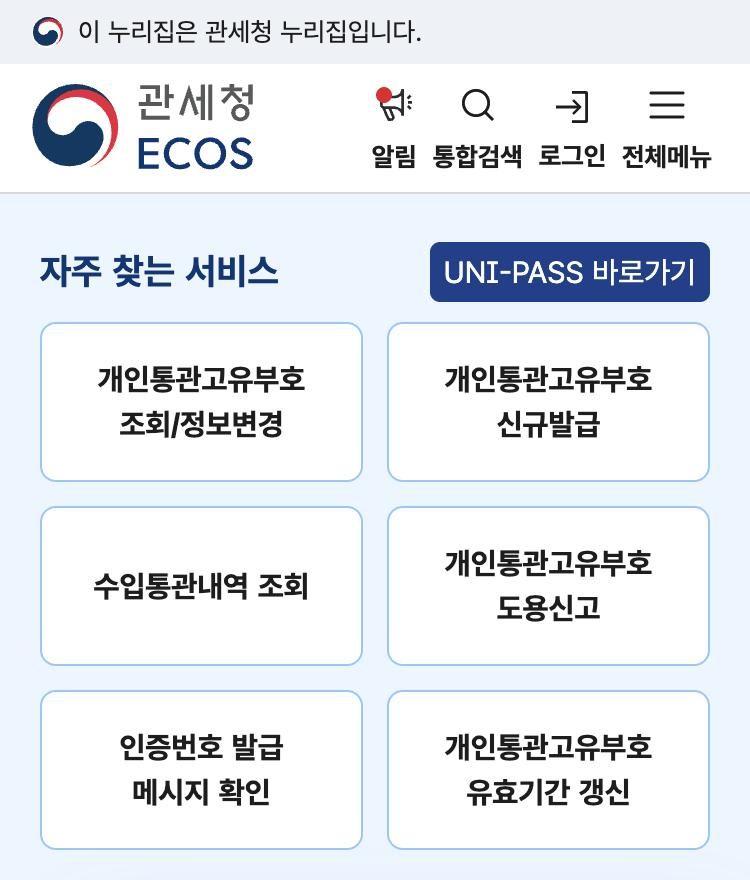
Open the portal and tap this button
Go to ecos.customs.go.kr. Close the pop-up with 닫기 (Close).
 1
2
3
4
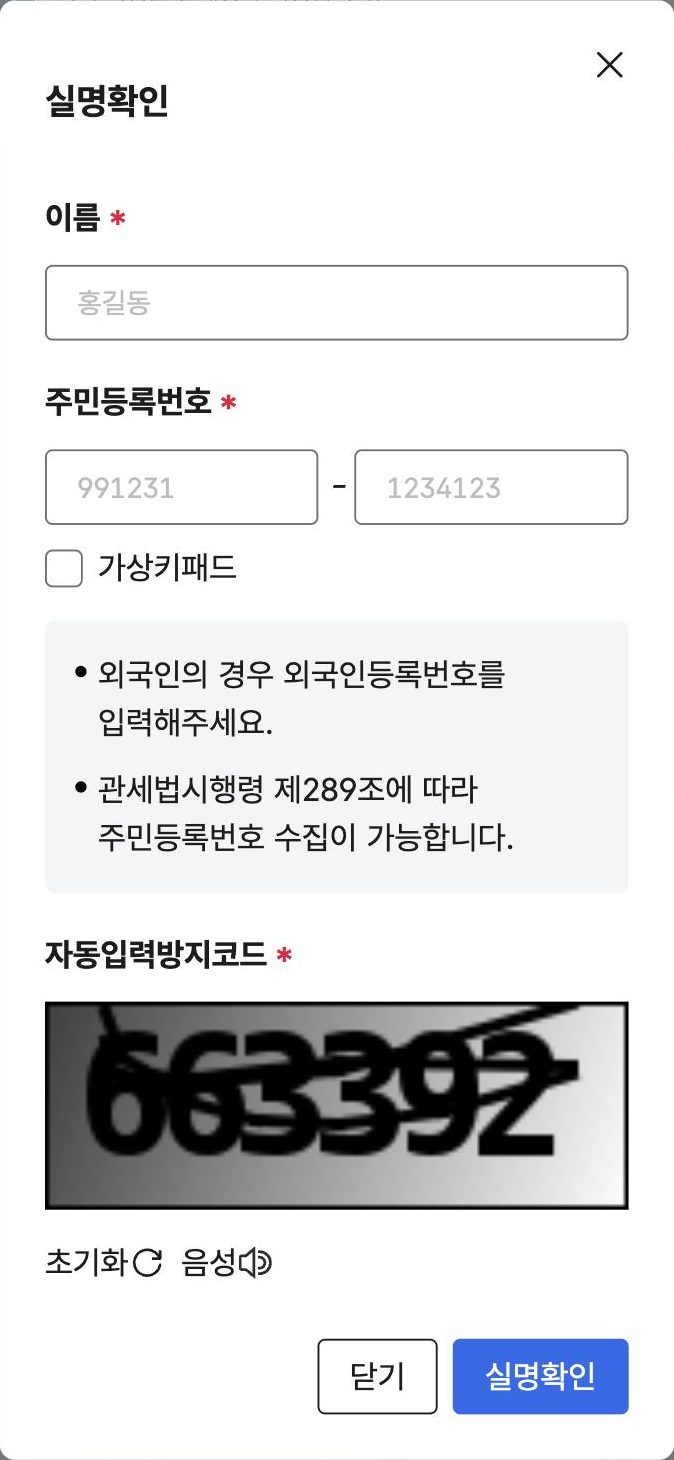
Confirm your real name
- 1이름 · NameExactly as printed on your residence card.
- 2주민등록번호 · Registration numberForeigners type the number on their residence card here. The grey box on the screen says the same.
- 3자동입력방지코드 · Security codeType the digits shown in the picture.
- 4실명확인 · ConfirmTap the blue button.
This screen only opens after a real ID check, so we can't show it yet.
Verify with your phone, then fill in the form
Expect to be asked for these:
Save your code
It appears right away: the letter P and 12 digits. Screenshot it. You'll paste it into shopping sites.
02Use it at checkout
- Enter your details and tap AuthenticateName, address, phone and code, on the shop's order page.
- Customs emails you a one-time numberOnly if your details match your code.
- Type the number in and paySome shops handle this step for you.
The name on the order doesn't match the name on the code. Use the same spelling, capitals and spaces everywhere.
The one-time number applies to codes issued or changed since 28 August 2026.
03Renew every year
Same home screen, this button
A code lasts one year. Renew from 30 days before it expires to 30 days after, or it is cancelled.
- Renewal opens
- –
- Expires
- –
- Last day to renew
- –
Code from before 2026? It first expires on your birthday in 2027.
04What the home screen says
1
2
3
4
5
6
- 1조회/정보변경Look up your code or change your details
- 2신규발급Get a new code
- 3수입통관내역 조회See parcels cleared under your code
- 4도용신고Report someone using your code
- 5인증번호 발급 메시지 확인Check your one-time number messages
- 6유효기간 갱신Renew your code
05If it doesn't work
My phone is not in my name
The online identity check will fail. Take your residence card to a customs office (세관). The portal has a pre-registration form for visits: 방문발급 사전신청.
I only have a passport (short-term visitor)
The online form asks for a registration number, so it expects a residence card. We could not confirm a route for visitors. Ask your courier or seller what they accept instead.
The name check keeps failing
Try your name in all capitals, in the order printed on your card, with no extra spaces.
I need to talk to someone
Portal technical support: 1544-1285. Customs customer centre: 125. Both numbers are listed on the portal.
—Where this comes from
- Korea Customs Service e-commerce customs portal, including its English launch notice of 27 August 2026
- Korea Customs Service, English FAQ on the customs code
- Customs Service announcement on yearly renewal (Korean)
Screenshots show the Korea Customs Service portal (ecos.customs.go.kr). Red marks and translations are ours.